Link

This was a fun project for me. I finally got to work with my group of friends to do something. It was fun to mess around with them and film this. We went for a parody of the Office theme and opening. We were gonna do an opening scene to go with it so it would meet the one minute criteria but we did’t have enough time to do that. So we are just uploading the theme and what we have. I still think it is really good.

First we started with filming all of the opening and establishing type of shots of Davis high school. Then, we proceeded to go and film the clips of us doing regular school stuff and introduce the characters, just like the Office does. After that, we went and put all the clips together. We made it cut into each other nicely and we added the theme music as well. It turned out really good, just it’s too bad that we didn’t have enough time to do all of our filming for the one minute. We were going to do a parody of the parkour opening scene that the Office does.

Scavenger Hunt

For the Scavenger Hunt project, we got into groups and filmed a whole bunch of clips on the list. We chose a lot of the action packed ideas to keep it fun. After we did all of that, we all went and edited our own version of those clips. I went in the direction of a movie trailer. I made it a super cheesy, intense trailer. I started it off by introducing everything and keeping it calm. After that, it turns into louder, faster music and cooler shots/video clips.

Link

First, I started by selecting which silent film clip I would like to use. I chose the “Our Gang” clip because I thought it had some fun sounds that I could make with Foley. After that I made a list of every sound that I needed to make so I could do it at home. I found stuff there that I could use to make the sounds. I then recorded myself doing the sounds and got a lot of good sound effects. After that I went into Audition and put all the sound together and edited it so it sounded nice and fit good with the video.

Link

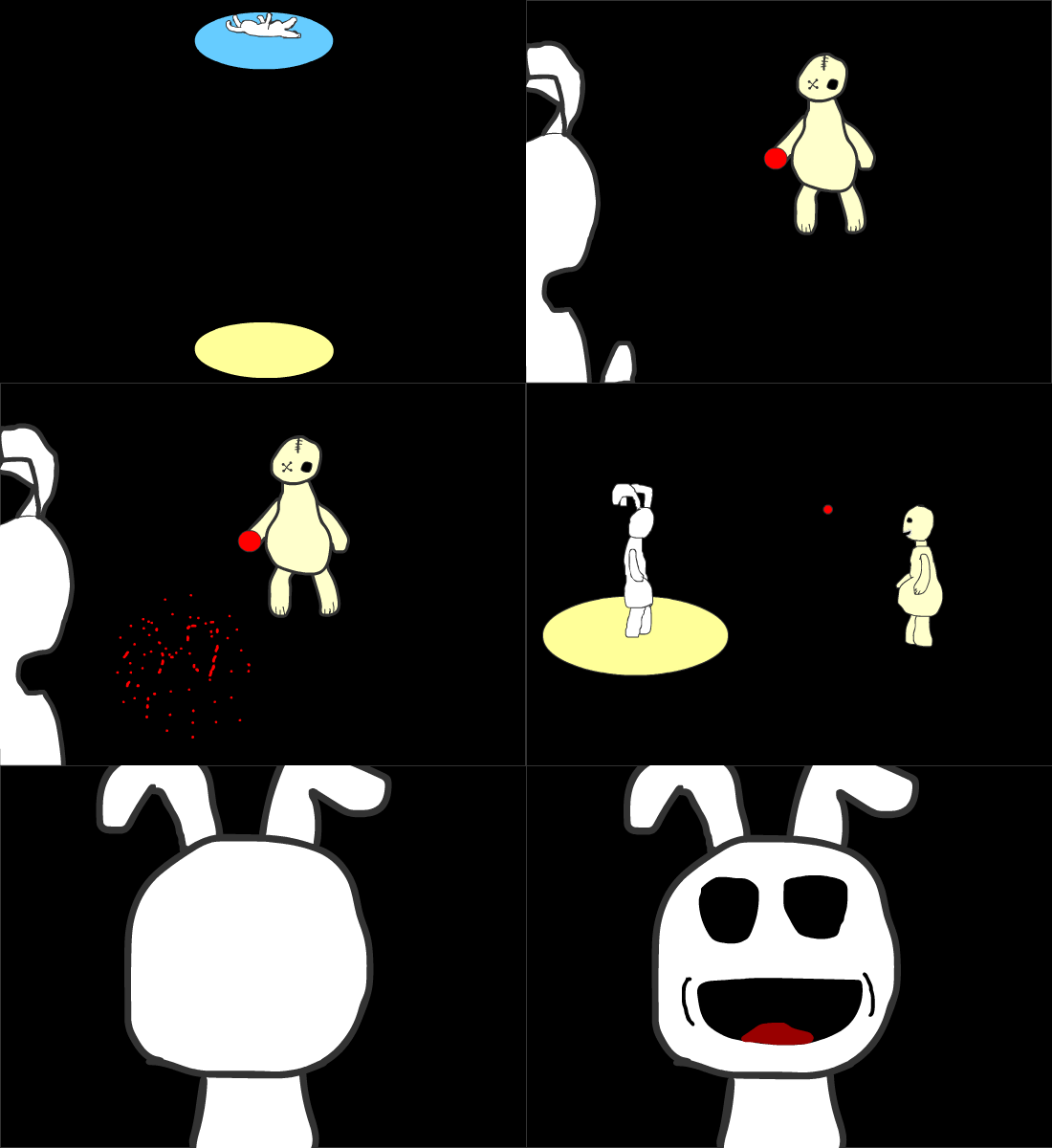
This is my 15 second animation. I wanted to have the story board as sort of dark and mysterious, but in the end it’s all about love and friendship. I showed that by having some what creepy characters who are actually just looking for a friend.

I started off by doing a simple story board, nothing too major, I wanted to kind of just think of most of the stuff on the fly. I did it scene by scene. I animated the first one by drawing what the characters will look like and get a feel for the dark environment. I went on to keep animating as this rabbit looking creature found himself in a hole. I kept the character drawings simple because in this case, I didn’t feel like it needed complex ones. I implemented a lot of the things that I learned in class to this, such as the ball and its squash and stretch and then also the mouth movements on a blank face type thing.

Link

With the process behind animating this walk cycle, I first got inspiration by the UFC fighter Conor McGregor’s famous intro walk before a match. He flails his arm and walks with wide steps while exaggerating everything.

I started it out by recording myself doing his walk. After that I had to convert it and put it into animate to do this all. I then made an outline with sticks and simple shapes to outline the key parts of the walk cycle. I filled in those key parts with the actual body I was going to use. Lastly I filled all the in between key frames that were not already done with the actual drawings I was going to use.

Link

For this image, I chose to go with the vintage portrait effect. I thought it would look best with the type of picture that was taken. To make the image look like a vintage photo, I added a gradient map to the image. I did the copper gradient because it looked the best. After the gradient map I added a gradient overlay and put a inner shadow on it. Then I added a texture that I got from the tutorial. I then messed around with some of the saturation and other things to get it the best possible look.

Link

The top Image is the original and the bottom image is the edited image. To make the bottom image, I did a combination of things. I wanted to make the photo brighter so I lowered the shadows. I then took out all of the blemishes and other things with the spot removal tool. I then proceeded to make some of the colors stand out more. I added more blue to the black and I wanted to make the whites pop. I also removed the darkness so my hair had more color to it rather than just black. I did a little bit of other small details but those are the most important ones.

Link

To create this image of space and some planets in it, I followed the instructions given by my teacher for Photoshop. First we had to make a black background and add noise to it for the effect of stars. after that we added some color like nebula in a desired spot by painting over it. After that we had to find some textures that would work for a planet. I added that those textures to two circular shapes. after that I added a sphere shape to the planet. I then continued to add a shadow and outer glow to the planets. With that all done, one of the planets required a ring. I made a ring in a separate file and transported it over to make it.

These are the two textures I used for my planets. One of them I wanted to a dark kind of creepy planet surface and the other a sort of moon look to it. For the planets, I made a black circle shape and added these textures to it. to make it look more like a planet, I spherized them. After that, I added shadow and glow to my planet for a more realistic look.

Reverse Engineer Typography

I decided to do my typography design on this Red Dead Redemption 2 poster. This game is close to its release date so I thought it was appropriate.

I got this from a Rockstar Games website that gave tribute to a fan that made this. https://www.rockstargames.com/newsite/newswire/article/52687/Fan-Art-by-iFadeFresh-Red-Dead-Redemption-Poster

There are multiple fonts used in this poster. Rockstar Games is a studio that loves to be perfect and only release things when ready. They must’ve liked this a lot to put this out with a fan making it. Its most dominant font is the large title of the game. It is a decorative style classification but following a slight sans serif rule by having it be more dull and “blocky” without a lot of enlarged edges. It’s supposed to give it a western and olden day type of look with the letters looking like they’ve been written with ink that maybe splatters over some pages and doesn’t get everywhere in the letters. They make it look relatively straight but not too straight so it looks like print and it is bolded so it stands out with the size.

This typography has a lot of additional, very small details to it. It has a sort of splatter to its letters and around them. I think to make it seem like some ink or maybe even blood is used to write it and it got a little messy. Or even like it got slammed down on the page and it splattered a little bit. Some of the letters also have a little bit of blank space in between them as if some ink or something didn’t get everywhere and it makes it seem not so perfect with how it is. The game is based in the late 1800s early 1900s and they want this poster to represent that it’s a western type game.

The other fonts are more professional. “Rockstar Games presents” is still wanting to look like it’s handwritten in ink because it is still linked to the title of the game. The other font for “A ROCKSTAR GAMES Production” is sans serif. They have that portion more regular looking also because that’s their company and they want to be seen as a professional company. They have their name also bolded to stand out more than the other words.

An overview, the main text at the bottom is a decorative and it is a sans serif but, it has some letters like the “D” and the “I” that have serifs, so again it shows off the sloppy, cowboy type of writing. The typing at the top is a sans serif and looks normal to show that they are a professional company. The lettering in the middle is a mix of decorative but looks a little less decorative. The whole thing comes together really good with the theme that the company is going for.



Personal Logo

I wanted to start out by making my logo about my favorite hobbies. Playing the ukulele/music and skateboarding are my favorite things to do so I wanted to make something that tied both of them in it. I couldn’t make anything that I liked or that looked good and this is all I had before changing my mind.

I decided just to cross the two without having to combine them as one. I did the two swords type logo. I liked this one with how simple it is but, it was a little too simple and wouldn’t work.

I liked the direction in which I was going with the color scheme and placement but I needed to make it not look so individual with the dice.

This was my final product. I liked the dice inside the black border to tie it together and not make it seem so spaced out. In some ways I think it is a little too much, but for this assignment I really like it.

With the T Shirt test, the white t shirt looked really good and I liked it being a little bit bigger and in the center. The black t shirt didn’t look as good since a lot of the color is black on black. It is a darker black and still in a way looks good with the black t shirt.